Features – how Kerala PSC LDC / LGS practice works on Kerala PYQ | Kerala PYQ

Kerala PSC LDC / LGS · practice bank

Everything in your Kerala PSC practice

4,532 questions from 47 past Kerala PSC LDC, LGS and 10th-level papers (2014–2026), each stamped with its exam and checked against KPSC's final answer key. The answer shows right after you choose. Around that bank are the tools below. Each one is a short recording of the real app on a phone.

Plan your day

01

Daily goal and streak

Pick how many questions a day: 10, 20, 30, 50 or your own number. The ring shows how far you are today and roughly how many minutes are left. Start opens exactly the questions you still need.

  • A 7-day tally, one stroke per fifth of your goal
  • Two rest days a week never break your streak
02

See what's left before you start

Choose a category, a subject, a year and how many questions. Every choice shows how many of those questions you have not answered yet. Tick only unanswered and you never see a question twice until you have covered the lot.

Practise with focus

03

Every question shows its exam

Each question card carries a small exam stamp: the Kerala PSC paper it was asked in and its question number in that paper. A red ✓ Final key stamp means the answer matches Kerala PSC's own final answer key. Tap the stamp to see the post, the department, the exam date and the category numbers.

  • All 4,532 answers taken, paper by paper, from the official KPSC answer keys (final key where published, provisional otherwise — marked)
  • Questions KPSC deleted after the exam are corrected so that exactly one option is right, and carry a blue Adapted stamp

04

Question navigator in every test

A strip of numbered boxes sits on top of each test. Green is right, red is wrong, and blank is still to do. Tap any number to jump back to it. The correct answer appears as soon as you choose, together with the paper and the year it came from.

05

A checkpoint every 5 questions

After every five answers you get a short note: how many you got right and which subjects to look at again. Answer several correctly in a row and a small streak message appears.

06

Every question as a grid

Open a whole paper, or the whole bank, as one grid of numbers coloured by status. Filter to not yet, skipped, wrong or correct, then tap numbers to pick questions and press Practice.

Understand, don't just memorise

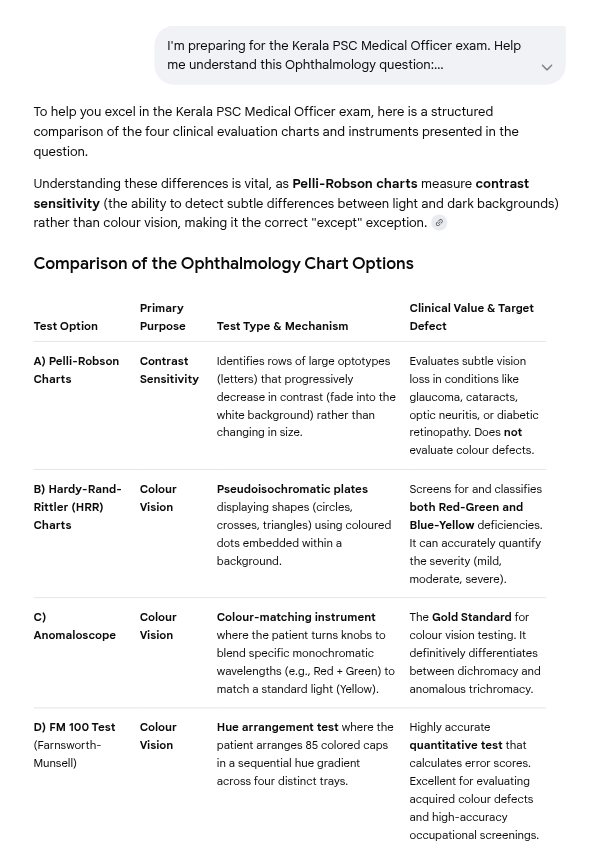
Gemini's answer: a table comparing the four ophthalmology options

07

AI explanation, the way you want it

One tap sends the question, its options and the correct answer to ChatGPT, Claude, Perplexity or Gemini. First choose what to ask for:

  • Full
  • Why right
  • Why not others
  • Memory trick
  • ✎ Ask my own

Ask my own lets you type your own question, e.g. “give a table comparing all four options”. The second picture is the answer that came back.

08

Report a doubtful answer

Think the key is wrong, the fact has changed since the exam, or there is a typo? Tell us in two taps, with a note if you like. Kerala PYQ reviews every report. Once a report is accepted, the question carries a ⚑ Disputed mark for everyone.

Revise what matters

09

Save questions and a revise list

Tap Save on any question you want to see again. Your revise list collects everything you saved and everything you got wrong. Practise it from the results screen, or choose Questions from → My revise list, Only wrong or Only saved in the setup.

Track your progress

10

Progress by subject, year and paper

A bar for every subject, from General Medicine to Pathology, and one for every exam year. Each bar shows right, wrong and skipped answers against the total, so your weak areas are easy to spot.

11

A weekly summary in your inbox

Every Sunday evening you get a short mail about your week:

  • questions answered, % correct and the days you met your goal
  • the subjects worth another look
  • the size of your revise list and how much of the bank you have covered

Every summary is checked by hand before it is sent.

Start free, subscribe when it helps

The sample quiz is free and needs no login. It has 10 real past-paper questions, the answer after each one, and one-tap AI explanations. The full bank and everything above come with a subscription.

Already subscribed? Go to your practice. AI answers come from third-party assistants and can be wrong. Check anything surprising against your textbook.